<?xml version="1.0" encoding="utf-8"?>
<feed xmlns="http://www.w3.org/2005/Atom">
  <link href="/feed.xml" rel="self" type="application/atom+xml" />
  <link href="/" rel="alternate" type="text/html" />
  <updated>2026-10-09T22:43:16+00:00</updated>
  <id>/feed.xml</id>
  <title type="html">ChadTaylor.dev</title>
  <subtitle>My musings on software</subtitle>
  <author><name>Chad Taylor</name></author>
  <entry>
    <title type="html">Cleaning up Docker volumes created by Testcontainers</title>
    <link href="/blog/cleaning-up-docker-volumes-created-by-testcontainers" rel="alternate" type="text/html" title="Cleaning up Docker volumes created by Testcontainers" />
    <published>2026-07-19T00:00:00+00:00</published>
    <updated>2026-07-19T00:00:00+00:00</updated>
    <id>/blog/cleaning-up-docker-volumes-created-by-testcontainers</id>
    <content type="html" xml:base="/blog/cleaning-up-docker-volumes-created-by-testcontainers"><![CDATA[<p>I like to use Testcontainers to provide databases for tests in my Ruby projects. It is fast, and the test data is ephemeral. Or at least, that is what I thought.</p>

<p>I recently noticed that when I run my tests, my project creates and deletes a container as expected, but it also creates a volume that is not cleaned up. I run my tests frequently, so I had dozens of volumes taking up gigabytes of storage. I decided to investigate.</p>

<p>I found a <a href="https://github.com/testcontainers/testcontainers-node/issues/816#issuecomment-2304063786">comment on an issue</a> in the Testcontainers NodeJS library that told me that some of the libraries have a 
method <code class="language-plaintext highlighter-rouge">.withRemoveVolumes</code> that instructs the implementation to clean up anonymous volumes after removing the container. However, this option is not available in the Ruby library. Instead, I found that when you call <code class="language-plaintext highlighter-rouge">remove</code> on a container, you have the opportunity to pass <a href="https://docs.docker.com/reference/api/engine/version/v1.55/#tag/Container/operation/ContainerDelete">options</a> that will ultimately be passed to the Docker engine.</p>

<p>Setting the <code class="language-plaintext highlighter-rouge">v</code> option to true instructs the Docker engine to remove anonymous volumes associated with the container. This was exactly what I needed!</p>

<p>There is another option <code class="language-plaintext highlighter-rouge">force</code> which tells the Docker engine to stop the container if it is running before removing it. I have adopted it as well so I can stop and remove the container in one call to the Docker engine.</p>

<p>Following is an excerpt of code from my <code class="language-plaintext highlighter-rouge">test_helper.rb</code> file. It sets up the container, removes it and exits if initialization fails, and removes it after all tests have run.</p>

<div class="language-ruby highlighter-rouge"><div class="highlight"><pre class="highlight"><code><span class="k">begin</span>
  <span class="n">pg</span> <span class="o">=</span> <span class="no">Testcontainers</span><span class="o">::</span><span class="no">PostgresContainer</span><span class="p">.</span><span class="nf">new</span><span class="p">(</span><span class="s2">"postgres:18"</span><span class="p">)</span><span class="p">.</span><span class="nf">start</span>

  <span class="c1"># other initialization...</span>

<span class="k">rescue</span> <span class="o">=&gt;</span> <span class="n">e</span>
  <span class="nb">warn</span><span class="p">(</span><span class="s2">"failed to initialize container: #{e}"</span><span class="p">)</span>
  <span class="n">pg</span><span class="o">&amp;</span><span class="p">.</span><span class="nf">remove</span><span class="p">(</span><span class="ss">force:</span> <span class="kc">true</span><span class="p">,</span> <span class="ss">v:</span> <span class="kc">true</span><span class="p">)</span>
  <span class="nb">exit</span><span class="p">(</span><span class="mi">1</span><span class="p">)</span>
<span class="k">end</span>

<span class="no">Minitest</span><span class="p">.</span><span class="nf">after_run</span> <span class="k">do</span>
  <span class="n">pg</span><span class="o">&amp;</span><span class="p">.</span><span class="nf">remove</span><span class="p">(</span><span class="ss">force:</span> <span class="kc">true</span><span class="p">,</span> <span class="ss">v:</span> <span class="kc">true</span><span class="p">)</span>
<span class="k">end</span>
</code></pre></div></div>

]]></content>
    <author><name>Chad Taylor</name></author>
    <category term="ruby" />
    <category term="testing" />
    <summary type="html">The way I was using Testcontainers left behind unused Docker volumes after every test run. I show how to prevent that in this post.</summary>
  </entry>
  <entry>
    <title type="html">Building CLIs with Thor</title>
    <link href="/blog/building-clis-with-thor" rel="alternate" type="text/html" title="Building CLIs with Thor" />
    <published>2025-08-10T00:00:00+00:00</published>
    <updated>2025-08-10T00:00:00+00:00</updated>
    <id>/blog/building-clis-with-thor</id>
    <content type="html" xml:base="/blog/building-clis-with-thor"><![CDATA[<p><a href="https://whatisthor.com">Thor</a> is a CLI building tool for Ruby. It is a more robust solution than the built-in <code class="language-plaintext highlighter-rouge">optparse</code> module and is more appropriate for larger scripts with multiple commands or subcommands.</p>

<p>I intend for this post to primarily augment the document on the Thor website. There are several features of Thor that are not documented on the site that I find useful in day-to-day use.</p>

<h2 id="quick-start">Quick start</h2>

<p>Following is a simple example of a CLI application built using Thor. It has one command <code class="language-plaintext highlighter-rouge">hello</code> that, greets the user.</p>

<div class="language-ruby highlighter-rouge"><div class="highlight"><pre class="highlight"><code><span class="c1"># example taken from whatisthor.com</span>

<span class="nb">require</span> <span class="s2">"thor"</span>

<span class="k">class</span> <span class="nc">MyCLI</span> <span class="o">&lt;</span> <span class="no">Thor</span>
  <span class="n">desc</span> <span class="s2">"hello NAME"</span><span class="p">,</span> <span class="s2">"say hello to NAME"</span>
  <span class="k">def</span> <span class="nf">hello</span><span class="p">(</span><span class="nb">name</span><span class="p">)</span>
    <span class="nb">puts</span> <span class="s2">"Hello #{name}"</span>
  <span class="k">end</span>
<span class="k">end</span>

<span class="no">MyCLI</span><span class="p">.</span><span class="nf">start</span><span class="p">(</span><span class="no">ARGV</span><span class="p">)</span>
</code></pre></div></div>

<h2 id="exit-on-failure">Exit on failure</h2>

<p>If you run the program in the [[#Quick start]] without providing a name, you will get the following output, and the exit status will be 0.</p>

<div class="language-plaintext highlighter-rouge"><div class="highlight"><pre class="highlight"><code>ERROR: "cli.rb hello" was called with no arguments
Usage: "cli.rb hello NAME"
Deprecation warning: Thor exit with status 0 on errors. To keep this behavior, you must define `exit_on_failure?` in `MyCLI`
You can silence deprecations warning by setting the environment variable THOR_SILENCE_DEPRECATION.
</code></pre></div></div>

<p>To get rid of the warning, add an <code class="language-plaintext highlighter-rouge">exit_on_failure?</code> static method to your class.</p>

<div class="language-ruby highlighter-rouge"><div class="highlight"><pre class="highlight"><code><span class="k">class</span> <span class="nc">MyCLI</span> <span class="o">&lt;</span> <span class="no">Thor</span>
  <span class="k">def</span> <span class="nf">self</span><span class="p">.</span><span class="nf">exit_on_failure?</span>
    <span class="kc">true</span>
  <span class="k">end</span>

  <span class="c1"># ...</span>
<span class="k">end</span>
</code></pre></div></div>

<p>If the value returned is <code class="language-plaintext highlighter-rouge">true</code>, you will get an exit status of 1 on error. If it is <code class="language-plaintext highlighter-rouge">false</code>, you will get an exit status of 0. I will always set this to <code class="language-plaintext highlighter-rouge">true</code> because it will work as expected in shell scripts, and it does not have a meaningful impact when calling it directly from a terminal barring any personalization that deals with exit values.</p>

<h2 id="options">Options</h2>

<p>You can add options by specifying option metadata like the following:</p>

<div class="language-ruby highlighter-rouge"><div class="highlight"><pre class="highlight"><code><span class="c1"># example taken from whatisthor.com</span>

<span class="nb">require</span> <span class="s2">"thor"</span>

<span class="k">class</span> <span class="nc">MyCLI</span> <span class="o">&lt;</span> <span class="no">Thor</span>
  <span class="n">desc</span> <span class="s2">"hello NAME"</span><span class="p">,</span> <span class="s2">"say hello to NAME"</span>
  <span class="n">option</span> <span class="ss">:from</span>
  <span class="k">def</span> <span class="nf">hello</span><span class="p">(</span><span class="nb">name</span><span class="p">)</span>
    <span class="nb">puts</span> <span class="s2">"from: #{options[:from]}"</span> <span class="k">if</span> <span class="n">options</span><span class="p">[</span><span class="ss">:from</span><span class="p">]</span>
    <span class="nb">puts</span> <span class="s2">"Hello #{name}"</span>
  <span class="k">end</span>
<span class="k">end</span>

<span class="no">MyCLI</span><span class="p">.</span><span class="nf">start</span><span class="p">(</span><span class="no">ARGV</span><span class="p">)</span>

<span class="c1">## Example usage</span>
<span class="c1">#</span>
<span class="c1"># &gt; `ruby ./cli.rb hello --from Fred Wilma`</span>
<span class="c1"># from: Fred</span>
<span class="c1"># Hello Wilma</span>
</code></pre></div></div>

<h3 id="configuring-options">Configuring options</h3>

<p>There are several parameters you can use to configure an option. The ones I use the most are <code class="language-plaintext highlighter-rouge">required</code>, <code class="language-plaintext highlighter-rouge">default</code>, <code class="language-plaintext highlighter-rouge">type</code>, <code class="language-plaintext highlighter-rouge">alias</code>, and <code class="language-plaintext highlighter-rouge">desc</code>. Here is an extension of the example above.</p>

<div class="language-ruby highlighter-rouge"><div class="highlight"><pre class="highlight"><code><span class="nb">require</span> <span class="s2">"thor"</span>

<span class="k">class</span> <span class="nc">MyCLI</span> <span class="o">&lt;</span> <span class="no">Thor</span>
  <span class="n">desc</span> <span class="s2">"hello NAME"</span><span class="p">,</span> <span class="s2">"say hello to NAME"</span>
  <span class="n">option</span> <span class="ss">:from</span><span class="p">,</span> <span class="ss">default:</span> <span class="s2">"your secret admirer"</span><span class="p">,</span> <span class="ss">desc:</span> <span class="s2">"Who is doing the greeting"</span><span class="p">,</span> <span class="ss">aliases:</span> <span class="p">[</span><span class="ss">:f</span><span class="p">]</span>
  <span class="k">def</span> <span class="nf">hello</span><span class="p">(</span><span class="nb">name</span><span class="p">)</span>
    <span class="nb">puts</span> <span class="s2">"from: #{options[:from]}"</span>
    <span class="nb">puts</span> <span class="s2">"Hello #{name}"</span>
  <span class="k">end</span>
<span class="k">end</span>
</code></pre></div></div>

<p>Note that we drop the <code class="language-plaintext highlighter-rouge">if</code> from the line where we print the <code class="language-plaintext highlighter-rouge">from:</code>. Since the <code class="language-plaintext highlighter-rouge">from</code> option provides a default, it will always have a value. Since we provide an alias (<code class="language-plaintext highlighter-rouge">:f</code>), we can invoke the program like <code class="language-plaintext highlighter-rouge">ruby ./cli.rb hello -f Fred Wilma</code> and get the same result.</p>

<p>Options are strings by default, but can be one of <a href="https://github.com/rails/thor/wiki/Method-Options#available-options">several types</a>.</p>

<p>Note that you can also defined an option at the <a href="https://whatisthor.com/#class-options">class level</a>, and it will apply to all methods in the class.</p>

<h3 id="enums">Enums</h3>

<p>One particular configuration option I would like to point out is <code class="language-plaintext highlighter-rouge">enum</code>. I often write scripts that have an option where the value belongs to a list of acceptable values, such as environment for running software.</p>

<p>Following is an example of a CLI that requires an <code class="language-plaintext highlighter-rouge">environment</code> option to be one of <code class="language-plaintext highlighter-rouge">local</code>, <code class="language-plaintext highlighter-rouge">testing</code>, or <code class="language-plaintext highlighter-rouge">production</code>.</p>

<div class="language-ruby highlighter-rouge"><div class="highlight"><pre class="highlight"><code><span class="k">class</span> <span class="nc">MyCLI</span> <span class="o">&lt;</span> <span class="no">Thor</span>
  <span class="k">def</span> <span class="nf">self</span><span class="p">.</span><span class="nf">exit_on_failure?</span>
    <span class="kc">true</span>
  <span class="k">end</span>

  <span class="n">desc</span> <span class="s2">"reset-db"</span><span class="p">,</span> <span class="s2">"Reset the database"</span>
  <span class="n">option</span> <span class="ss">:environment</span><span class="p">,</span> <span class="ss">desc:</span> <span class="s2">"The env for the db"</span><span class="p">,</span> <span class="ss">default:</span> <span class="s2">"local"</span><span class="p">,</span> <span class="ss">enum:</span> <span class="o">%</span><span class="n">w</span><span class="p">[</span><span class="n">local</span> <span class="n">testing</span> <span class="n">production</span><span class="p">]</span><span class="p">,</span> <span class="ss">aliases:</span> <span class="ss">:e</span>
  <span class="k">def</span> <span class="nf">reset_db</span>
    <span class="nb">puts</span> <span class="s2">"Resetting the database in the #{options[:environment]} environment..."</span>
    <span class="c1"># ...</span>
  <span class="k">end</span>
<span class="k">end</span>

<span class="c1">## Example usage</span>
<span class="c1">#</span>
<span class="c1"># &gt; ruby ./cli.rb reset-db</span>
<span class="c1"># Resetting the database in the local environment...</span>
<span class="c1">#</span>
<span class="c1"># &gt; ruby ./cli.rb reset-db -e testing</span>
<span class="c1"># Resetting the database in the testing environment...</span>
<span class="c1">#</span>
<span class="c1"># &gt; ruby ./cli.rb reset-db -e other</span>
<span class="c1"># Expected '--environment' to be one of local, testing, production; got other</span>
</code></pre></div></div>

<p>Note that the help includes the values as well.</p>

<div class="language-plaintext highlighter-rouge"><div class="highlight"><pre class="highlight"><code>&gt; ruby ./cli.rb help reset-db
Usage:
  cli.rb reset-db

Options:
  -e, [--environment=ENVIRONMENT]  # The env for the db
                                   # Default: local
                                   # Possible values: local, testing, production

Reset the database
</code></pre></div></div>

<h2 id="setting-the-default-command">Setting the default command</h2>

<p>Note that most of the examples in this post are applications with only one command. It is possible by specifying the <code class="language-plaintext highlighter-rouge">default_command</code> on the class.</p>

<div class="language-ruby highlighter-rouge"><div class="highlight"><pre class="highlight"><code><span class="k">class</span> <span class="nc">MyCLI</span> <span class="o">&lt;</span> <span class="no">Thor</span>
  <span class="n">default_command</span> <span class="ss">:hello</span>

  <span class="n">desc</span> <span class="s2">"hello"</span><span class="p">,</span> <span class="s2">"say hello"</span>
  <span class="n">option</span> <span class="ss">:name</span><span class="p">,</span> <span class="ss">required:</span> <span class="kc">true</span>
  <span class="k">def</span> <span class="nf">hello</span>
    <span class="nb">puts</span> <span class="s2">"Hello #{options[:name]}"</span>
  <span class="k">end</span>
<span class="k">end</span>

<span class="c1">## Example usage</span>
<span class="c1">#</span>
<span class="c1"># &gt; ruby ./cli.rb --name Wilma</span>
<span class="c1"># Hello Wilma</span>
</code></pre></div></div>

<p>The catch is that this does not work well if the default command requires arguments. Consider the following example.</p>

<div class="language-ruby highlighter-rouge"><div class="highlight"><pre class="highlight"><code><span class="k">class</span> <span class="nc">MyCLI</span> <span class="o">&lt;</span> <span class="no">Thor</span>
  <span class="n">default_command</span> <span class="ss">:hello</span>

  <span class="k">def</span> <span class="nf">self</span><span class="p">.</span><span class="nf">exit_on_failure?</span>
    <span class="kc">true</span>
  <span class="k">end</span>

  <span class="n">desc</span> <span class="s2">"hello NAME"</span><span class="p">,</span> <span class="s2">"say hello to NAME"</span>
  <span class="n">option</span> <span class="ss">:from</span>
  <span class="k">def</span> <span class="nf">hello</span><span class="p">(</span><span class="nb">name</span><span class="p">)</span>
    <span class="nb">puts</span> <span class="s2">"from: #{options[:from]}"</span> <span class="k">if</span> <span class="n">options</span><span class="p">[</span><span class="ss">:from</span><span class="p">]</span>
    <span class="nb">puts</span> <span class="s2">"Hello #{name}"</span>
  <span class="k">end</span>
<span class="k">end</span>
</code></pre></div></div>

<p>Note that <code class="language-plaintext highlighter-rouge">NAME</code> is a required argument.</p>

<p>If we run this without specifying the command and providing the name, we get the following.</p>

<div class="language-plaintext highlighter-rouge"><div class="highlight"><pre class="highlight"><code>&gt; ruby ./cli.rb Wilma
Could not find command "Wilma".
</code></pre></div></div>

<p>However, if we specify the <code class="language-plaintext highlighter-rouge">:from</code> option, we get a different result.</p>

<div class="language-plaintext highlighter-rouge"><div class="highlight"><pre class="highlight"><code>&gt; ruby ./cli.rb --from Fred Wilma
from: Fred
Hello Wilma
</code></pre></div></div>

<p>This makes sense because Thor can tell based on the option that we are not specifying a command. However, when we do not have an option, it cannot tell the difference between a command and an argument.</p>

<p>I think a reasonable rule of thumb is that if you set a default command, it should not have arguments. Any configuration should be presented as options, some of which may be <code class="language-plaintext highlighter-rouge">required</code>.</p>

]]></content>
    <author><name>Chad Taylor</name></author>
    <category term="ruby" />
    <category term="cli" />
    <summary type="html">A quick primer on building CLIs with Thor, a Ruby library.</summary>
  </entry>
  <entry>
    <title type="html">Profiling Rust Applications</title>
    <link href="/blog/profiling-rust-applications" rel="alternate" type="text/html" title="Profiling Rust Applications" />
    <published>2025-06-16T00:00:00+00:00</published>
    <updated>2025-06-16T00:00:00+00:00</updated>
    <id>/blog/profiling-rust-applications</id>
    <content type="html" xml:base="/blog/profiling-rust-applications"><![CDATA[<p>Today I wanted to improve the performance of my <a href="https://github.com/tessellator/solver-of-squares-rs">solver-of-squares-rs</a> project. I needed to find a profiler for my application. After doing a little research, I settled on using two different tools: <a href="https://github.com/flamegraph-rs/flamegraph">flamegraph</a> and <a href="https://github.com/mstange/samply">samply</a>.</p>

<h2 id="flamegraph">Flamegraph</h2>

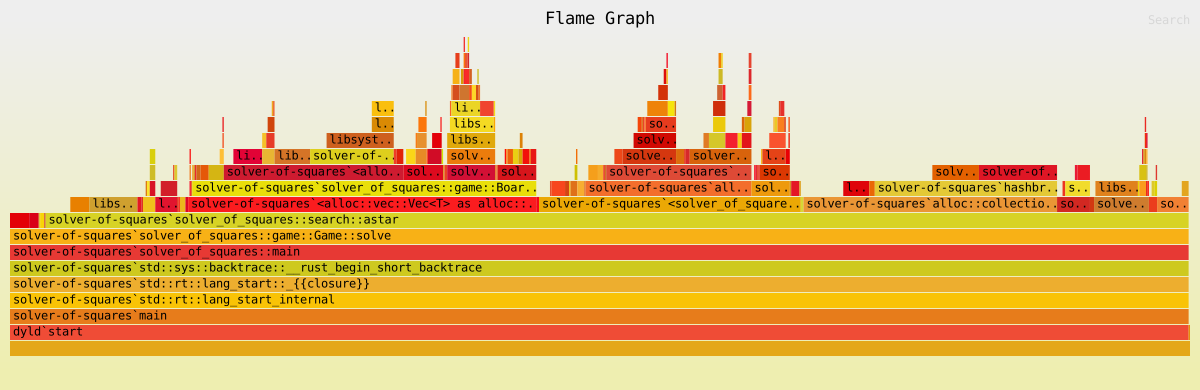
<p>Flamegraph profiles your application and, perhaps unsuprisingly, produces a flamegraph as an SVG. If you open the SVG and place your mouse cursor on one of the blocks, you will see additional information appear at the bottom of the image, including the full function name, the sample count, and the percentage. It also has a <em>very faint</em> search box in the upper-right corner. This tool particularly useful for generating flamegraphs that you can share with others. You can run it using the following command:</p>

<p><code class="language-plaintext highlighter-rouge">CARGO_PROFILE_RELEASE_DEBUG=true cargo flamegraph --root -- ./my/app/arguments</code></p>

<p>I prefer to use the <code class="language-plaintext highlighter-rouge">CARGO_PROFILE_RELEASE_DEBUG</code> environment variable instead of changing the release profile in the cargo file unless I plan on shipping debug symbols into my production environment. Using the environment variable is less invasive, and it is something I do not have to remember to disable later.</p>

<p>Using <code class="language-plaintext highlighter-rouge">--root</code> is necessary when running on macOS. If you do not use it you will get dtrace errors like the following:</p>

<div class="language-plaintext highlighter-rouge"><div class="highlight"><pre class="highlight"><code>dtrace: system integrity protection is on, some features will not be available
dtrace: failed to initialize dtrace: DTrace requires additional privileges
failed to sample program
</code></pre></div></div>

<p>Here is an example output. If you want to interact with it, click the image to open it in a new tab.</p>

<p><a href="/assets/img/blog/sos_flamegraph_before.svg" target="_none" alt="sample flamegraph output"><img src="/assets/img/blog/sos_flamegraph_before.svg"></a></p>

<h2 id="samply">Samply</h2>

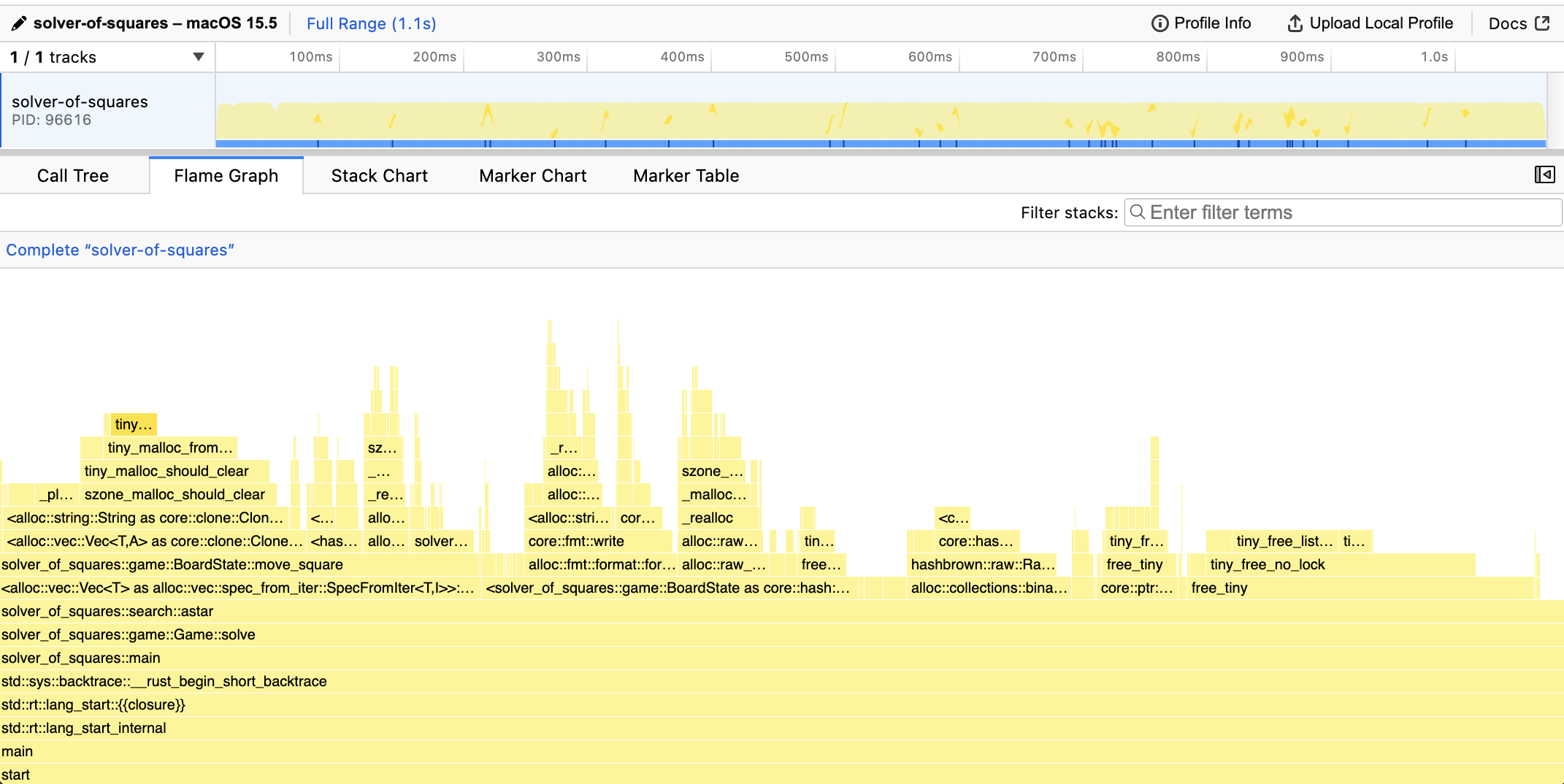
<p>Samply is another profiler that uses the Firefox profiler as its UI. This has a better developer experience while working on the code, but it is less convenient to share with others. While I use flamegraph with cargo, I run samply against the release target directly. You can run it using the following command:</p>

<p><code class="language-plaintext highlighter-rouge">samply record ./target/release/my-app ./my/app/arguments</code></p>

<p>When the program exits, samply will open a browser and display the flamegraph. You can also view CPU history, a call tree, and a stack chart. Unfortunately the profile will not open in Safari (my preferred browser), so you will need to open it in Firefox or a Chromium-based browser.</p>

<p><img src="/assets/img/blog/sos_samply_before.png" alt="sample samply output" /></p>

<p>Both flamegraph and samply are fantastic tools and I will continue to use both of them.</p>

]]></content>
    <author><name>Chad Taylor</name></author>
    <category term="rust" />
    <summary type="html">This post describes how to profile Rust applications using two different tools, flamegraph and samply.</summary>
  </entry>
  <entry>
    <title type="html">Fixing the Obsidian sidebar button with custom CSS</title>
    <link href="/blog/fixing-obsidian-sidebar-button-with-custom-css" rel="alternate" type="text/html" title="Fixing the Obsidian sidebar button with custom CSS" />
    <published>2024-08-18T00:00:00+00:00</published>
    <updated>2024-08-18T00:00:00+00:00</updated>
    <id>/blog/fixing-obsidian-sidebar-button-with-custom-css</id>
    <content type="html" xml:base="/blog/fixing-obsidian-sidebar-button-with-custom-css"><![CDATA[<p><a href="https://obsidian.md">Obsidian</a> is one of my favorite tools. However, there is
one very minor detail about the UI that really bothers me: the sidebar toggle
button moves when you click it.</p>

<p><img src="/assets/img/blog/obsidian_sidebar_toggle_default.gif" alt="animation of default Obsidian sidebar toggle behavior" /></p>

<p>I have used Safari for a long time, and I am used to its behavior. When you
click the sidebar toggle button in Safari, it remains fixed in place.</p>

<p><img src="/assets/img/blog/safari_sidebar_toggle.gif" alt="animation of Safari sidebar toggle behavior" /></p>

<p>Thankfully, Obsidian provides a way for you to customize its UI using
<a href="https://help.obsidian.md/Extending+Obsidian/CSS+snippets">CSS snippets</a>. Here
is the snippet I use to fix the button in place.</p>

<div class="language-css highlighter-rouge"><div class="highlight"><pre class="highlight"><code><span class="nc">.mod-left-split</span> <span class="nc">.sidebar-toggle-button</span> <span class="p">{</span>
  <span class="na">order</span><span class="o">:</span> -2<span class="p">;</span>
<span class="p">}</span>

<span class="nc">.mod-sidedock</span><span class="nc">.mod-left-split</span> <span class="nc">.workspace-tab-header-container-inner</span> <span class="p">{</span>
  <span class="na">order</span><span class="o">:</span> <span class="mi">2</span><span class="p">;</span>
<span class="p">}</span>
</code></pre></div></div>

<p><img src="/assets/img/blog/obsidian_sidebar_toggle_customized.gif" alt="animation of customized Obsidian sidebar toggle behavior" /></p>

<p>This feels much better to me overall. I am grateful that Obsidian offers the
capability for me to make this change.</p>

]]></content>
    <author><name>Chad Taylor</name></author>
    <category term="css" />
    <category term="obsidian" />
    <summary type="html">The Obsidian sidebar button moves when you click it! This post describes how to write custom CSS to fix it in place.</summary>
  </entry>
  <entry>
    <title type="html">A Solver of Squares (in Rust)</title>
    <link href="/blog/a-solver-of-squares-in-rust" rel="alternate" type="text/html" title="A Solver of Squares (in Rust)" />
    <published>2024-01-17T00:00:00+00:00</published>
    <updated>2024-01-17T00:00:00+00:00</updated>
    <id>/blog/a-solver-of-squares-in-rust</id>
    <content type="html" xml:base="/blog/a-solver-of-squares-in-rust"><![CDATA[<p>When I am learning a new programming language, I like to have a small project to work through to guide my learning.</p>

<p>I struggled to learn Clojure. It was radically different from any code I had written previously. However, it seemed really cool and I wanted to be able to use it.</p>

<p>Around the time, my friend Tony discovered <a href="http://gameaboutsquares.com">Game about Squares</a>, and we made a friendly bet about whether he could solve all the puzzles before I could write a solver for them. Tony won.</p>

<p>However, it turned out a project like this was exactly what I needed to pull all the concepts together. The result was <a href="https://github.com/tessellator/solver-of-squares">solver-of-squares</a>. Not only did this let me pull together the various ideas of the language, but it helped me to explore some interesting corners of language, like <code class="language-plaintext highlighter-rouge">transient</code> and <code class="language-plaintext highlighter-rouge">persistent!</code>.</p>

<p>I have been using Clojure for a long time now, so I consider the project a success.</p>

<p>Rust has been on my to-learn list for a few years now. I spent a few years writing C++ professionally, so the idea of memory safety without a garbage collector was interesting to me. That safety extending to concurrency was honestly mind boggling.</p>

<p>I am struggling to learn Rust. It is not a small language, and it does not appear simple at first. I did not find any of the concepts particularly challenging, but I find that the combination of them requires me to design programs differently than I have before.</p>

<p>It would be easy for me to dismiss Rust, although doing so would bother me. I don’t like to give up on learning something. Once again, I needed a small project to help bring everything into focus.</p>

<p>I decided to port my solver-of-squares project to Rust, and today I am making <a href="https://github.com/tessellator/solver-of-squares-rs">solver-of-squares-rs</a> public.</p>

<p>There are still some things to address on the project.</p>

<p>The heuristic I use is not admissible. This means that the output of the program, while correct, may not be optimal. Solutions today may require more steps than strictly necessary to solve a puzzle.</p>

<p>The performance needs some more attention. After doing some profiling, I see that the majority of the time spent in the application is copying strings from state to state. I think I would like to work a solution that requires less copying. In order to do that, I will have to change the structures of the application a bit.</p>

<p>There are probably stylistic or other issues with the Rust code itself. Constructive criticism and PRs are welcome, and I will probably ask plenty of questions.</p>

<p>This feels like a good first step in my Rust journey, and I am excited to figure out where to go next.</p>

]]></content>
    <author><name>Chad Taylor</name></author>
    <category term="rust" />
    <summary type="html">In this post, I describe the motivation behind my first public Rust project, solver-of-squares-rs.</summary>
  </entry>
  <entry>
    <title type="html">Go's Special Case for Function Calls</title>
    <link href="/blog/special-case-for-go-function-calls" rel="alternate" type="text/html" title="Go's Special Case for Function Calls" />
    <published>2022-06-05T00:00:00+00:00</published>
    <updated>2022-06-05T00:00:00+00:00</updated>
    <id>/blog/special-case-for-go-function-calls</id>
    <content type="html" xml:base="/blog/special-case-for-go-function-calls"><![CDATA[<p>I was playing around with the <a href="https://pkg.go.dev/html/template">html/template package</a> in a small Go project when I stumbled across the following line of code.</p>

<div class="language-go highlighter-rouge"><div class="highlight"><pre class="highlight"><code><span class="n">t</span> <span class="o">:=</span> <span class="n">template</span><span class="p">.</span><span class="nf">Must</span><span class="p">(</span><span class="n">template</span><span class="p">.</span><span class="nf">ParseFS</span><span class="p">(</span><span class="n">fs</span><span class="p">,</span> <span class="n">path</span><span class="p">)</span><span class="p">)</span>
</code></pre></div></div>

<p>I am sure I copied this from a book or tutorial at some point in the past. I have always found this usage <code class="language-plaintext highlighter-rouge">template.Must</code> to be confusing. The documentation states that it takes two parameters, but it appears I only pass it one!</p>

<p>Inspection of the return type <code class="language-plaintext highlighter-rouge">template.ParseFS</code> shows it returns multiple values, and its output matches the required input for <code class="language-plaintext highlighter-rouge">template.Must</code>. It struck me that the output from one function was being spread across the inputs of another.</p>

<p>I felt as if this was a language feature of which I was unaware. I set out to find some documentation and found this <a href="https://go.dev/ref/spec#Calls">gem</a> in the Go Programming Language Specification:</p>

<blockquote>
<p>As a special case, if the return values of a function or method <code class="language-plaintext highlighter-rouge">g</code> are equal in number and individually assignable to the parameters of another function or method <code class="language-plaintext highlighter-rouge">f</code>, then the call <code class="language-plaintext highlighter-rouge">f(g(parameters_of_g))</code> will invoke <code class="language-plaintext highlighter-rouge">f</code> after binding the return values of <code class="language-plaintext highlighter-rouge">g</code> to the parameters of <code class="language-plaintext highlighter-rouge">f</code> in order. The call of <code class="language-plaintext highlighter-rouge">f</code> must contain no parameters other than the call of <code class="language-plaintext highlighter-rouge">g</code>, and <code class="language-plaintext highlighter-rouge">g</code> must have at least one return value. If <code class="language-plaintext highlighter-rouge">f</code> has a final <code class="language-plaintext highlighter-rouge">...</code> parameter, it is assigned the return values of <code class="language-plaintext highlighter-rouge">g</code> that remain after assignment of regular parameters.</p>

</blockquote>

<p>I will likely use this sparingly because this special case is not intuitive. However, I think it can be used to make code more terse. In the case of <code class="language-plaintext highlighter-rouge">template.Must</code> above, it saves me from creating an error variable.</p>

]]></content>
    <author><name>Chad Taylor</name></author>
    <category term="golang" />
    <summary type="html">In this post, I examine the special case of parameter assignment in Go when calling one function inside the parameter list of another.</summary>
  </entry>
  <entry>
    <title type="html">Submitting a Form to an Index Route in Remix</title>
    <link href="/blog/submitting-a-form-to-an-index-route-in-remix" rel="alternate" type="text/html" title="Submitting a Form to an Index Route in Remix" />
    <published>2022-05-15T00:00:00+00:00</published>
    <updated>2022-05-15T00:00:00+00:00</updated>
    <id>/blog/submitting-a-form-to-an-index-route-in-remix</id>
    <content type="html" xml:base="/blog/submitting-a-form-to-an-index-route-in-remix"><![CDATA[<p>I ran into a small issue working with forms in index routes with Remix. I was working on an application that submitted a form on the default index route <code class="language-plaintext highlighter-rouge">app/routes/index.tsx</code>. I created an action function to handle the form submission, but when I submitted the form Remix would return a <code class="language-plaintext highlighter-rouge">405 Method Not Allowed</code> response.</p>

<p>Following is a sample application that demonstrates the issue.</p>

<div class="language-jsx highlighter-rouge"><div class="highlight"><pre class="highlight"><code><span class="k">import</span> <span class="kd">type</span> <span class="p">{</span> <span class="nc">ActionFunction</span> <span class="p">}</span> <span class="k">from</span> <span class="s2">"@remix-run/server-runtime"</span><span class="p">;</span>
<span class="k">import</span> <span class="p">{</span> <span class="n">useActionData</span> <span class="p">}</span> <span class="k">from</span> <span class="s2">"@remix-run/react"</span><span class="p">;</span>

<span class="k">export</span> <span class="kd">let</span> <span class="n">action</span><span class="o">:</span> <span class="nc">ActionFunction</span> <span class="o">=</span> <span class="k">async</span> <span class="p">(</span><span class="p">{</span> <span class="n">request</span> <span class="p">}</span><span class="p">)</span> <span class="o">=&gt;</span> <span class="p">{</span>
  <span class="kd">let</span> <span class="n">formData</span> <span class="o">=</span> <span class="k">await</span> <span class="n">request</span><span class="p">.</span><span class="nf">formData</span><span class="p">(</span><span class="p">)</span><span class="p">;</span>
  <span class="kd">let</span> <span class="n">name</span> <span class="o">=</span> <span class="n">formData</span><span class="p">.</span><span class="nf">get</span><span class="p">(</span><span class="s2">"name"</span><span class="p">)</span><span class="p">;</span>

  <span class="k">return</span> <span class="p">{</span> <span class="n">name</span> <span class="p">}</span><span class="p">;</span>
<span class="p">}</span><span class="p">;</span>

<span class="k">export</span> <span class="k">default</span> <span class="kd">function</span> <span class="nf">Index</span><span class="p">(</span><span class="p">)</span> <span class="p">{</span>
  <span class="kd">let</span> <span class="n">data</span> <span class="o">=</span> <span class="n">useActionData</span><span class="o">&lt;</span><span class="p">{</span> <span class="n">name</span><span class="o">?:</span> <span class="n">string</span> <span class="p">}</span><span class="o">&gt;</span><span class="p">(</span><span class="p">)</span><span class="p">;</span>
  <span class="kd">let</span> <span class="n">name</span> <span class="o">=</span> <span class="n">data</span><span class="o">?</span><span class="p">.</span><span class="n">name</span><span class="p">;</span>

  <span class="k">return</span> <span class="p">(</span>
    <span class="o">&lt;&gt;</span>
      <span class="p">{</span><span class="n">name</span> <span class="o">?</span> <span class="o">&lt;</span><span class="n">h1</span><span class="o">&gt;</span><span class="p">{</span><span class="sb">`Hello, ${name}!`</span><span class="p">}</span><span class="o">&lt;/</span><span class="n">h1</span><span class="o">&gt;</span> <span class="o">:</span> <span class="kc">null</span><span class="p">}</span>
      <span class="o">&lt;</span><span class="n">form</span> <span class="n">method</span><span class="o">=</span><span class="s2">"post"</span><span class="o">&gt;</span>
        <span class="o">&lt;</span><span class="n">input</span> <span class="kd">type</span><span class="o">=</span><span class="s2">"text"</span> <span class="n">name</span><span class="o">=</span><span class="s2">"name"</span> <span class="o">/&gt;</span>
        <span class="o">&lt;</span><span class="n">button</span> <span class="kd">type</span><span class="o">=</span><span class="s2">"submit"</span><span class="o">&gt;</span><span class="nc">Greet</span><span class="o">&lt;/</span><span class="n">button</span><span class="o">&gt;</span>
      <span class="o">&lt;/</span><span class="n">form</span><span class="o">&gt;</span>
    <span class="o">&lt;/&gt;</span>
  <span class="p">)</span><span class="p">;</span>
<span class="p">}</span>
</code></pre></div></div>

<p>So what is happening? Remix routes are a tree and so it needs to disambiguate between a root layout route and a child route. The sample above provides the action in an index route but does not provide a hint to Remix, so Remix assumes the action is defined in the parent layout route (<code class="language-plaintext highlighter-rouge">app/root.tsx</code> in this case).</p>

<p>Remix uses the presence of a query parameter called index as a hint that it should not use the parent layout root but should instead use the index route for handling an action. See the <a href="https://remix.run/docs/en/v1/guides/routing#what-is-the-index-query-param">Remix docs</a> for more details. We can either provide the hint manually or use the <code class="language-plaintext highlighter-rouge">Form</code> component which provides the hint  automatically.</p>

<p>To provide the hint manually, change the form element to an attribute <code class="language-plaintext highlighter-rouge">action="?index"</code> like in the following code.</p>

<div class="language-jsx highlighter-rouge"><div class="highlight"><pre class="highlight"><code><span class="o">&lt;</span><span class="n">form</span> <span class="n">method</span><span class="o">=</span><span class="s2">"post"</span> <span class="n">action</span><span class="o">=</span><span class="s2">"?index"</span><span class="o">&gt;</span>
  <span class="o">&lt;</span><span class="n">input</span> <span class="kd">type</span><span class="o">=</span><span class="s2">"text"</span> <span class="n">name</span><span class="o">=</span><span class="s2">"name"</span> <span class="o">/&gt;</span>
  <span class="o">&lt;</span><span class="n">button</span> <span class="kd">type</span><span class="o">=</span><span class="s2">"submit"</span><span class="o">&gt;</span><span class="nc">Greet</span><span class="o">&lt;/</span><span class="n">button</span><span class="o">&gt;</span>
<span class="o">&lt;/</span><span class="n">form</span><span class="o">&gt;</span>
</code></pre></div></div>

<p>Using the Remix <code class="language-plaintext highlighter-rouge">Form</code> element not only provides this automatically but also provides an <code class="language-plaintext highlighter-rouge">enctype="application/x-www-form-urlencoded"</code>. I will probably just use the provided <code class="language-plaintext highlighter-rouge">Form</code> element by default moving forward.</p>

]]></content>
    <author><name>Chad Taylor</name></author>
    <category term="remix" />
    <summary type="html">I ran into a small issue submitting forms on index routes with Remix. This article describes the problem and solution.</summary>
  </entry>
  <entry>
    <title type="html">Visually navigating the data flowing through your serverless functions</title>
    <link href="/blog/visually-navigating-the-data-flowing-through-your-serverless-functions" rel="alternate" type="text/html" title="Visually navigating the data flowing through your serverless functions" />
    <published>2021-10-06T00:00:00+00:00</published>
    <updated>2021-10-06T00:00:00+00:00</updated>
    <id>/blog/visually-navigating-the-data-flowing-through-your-serverless-functions</id>
    <content type="html" xml:base="/blog/visually-navigating-the-data-flowing-through-your-serverless-functions"><![CDATA[<div class="alert alert-info" role="alert">
    <span class="icon"></span>
    <div class="content">
        <p>
            My friend <a style="text-decoration: underline" href="https://djblue.github.io/">Chris Badahdah</a> and I co-authored this post. Thanks, Chris!
        </p>
    </div>
</div>

<p>Last week my friend Chris and I met and discussed our current side projects. Chris builds and maintains <a href="https://github.com/djblue/portal">portal</a>, a Clojure tool to navigate through your data. It allows you to explore Clojure data structures, JSON, and other data formats. It also sports really great REPL integration. I am working on <a href="https://fnrun.dev">fnrun</a>, which provides application architecture for business (serverless) functions.</p>

<p>Toward the end of our conversation, we discussed whether we could use portal to visualize data flowing through an fnrun system. We designed and built a new fnrun middleware called <code class="language-plaintext highlighter-rouge">tap</code> to support this use case. This article will show you how to set it up so you can try it out.</p>

<h2 id="requirements">Requirements</h2>

<p>Here are the requirements for running this demo.</p>

<ol>
  <li>Download the <a href="https://github.com/fnrun/fnrun/releases">latest release</a> of fnrun (v0.7.0 or later) and put the fnrunner executable on your path. We will use the fnrunner program to build up application infrastructure (e.g., an HTTP server) and execute your business function.</li>
  <li>Install Python (if not already on your system). We will write a business function in Python. However, you are free to use whatever language or technology makes sense for you.</li>
  <li>Install <a href="https://babashka.org/">Babashka</a>. We will use it to execute a script that runs and interacts with portal.</li>
  <li>Download the <a href="https://github.com/djblue/portal/blob/master/examples/parse-and-tap">parse-and-tap</a> script from the portal repository and put it in a project directory. Ensure that it is executable (e.g., <code class="language-plaintext highlighter-rouge">chmod +x ./parse-and-tap</code>).</li>
</ol>

<p>The rest of this article assumes you know the basics of using fnrun to build and run business functions. Check out the <a href="https://fnrun.dev/tutorial/building-and-running/">second part</a> of the fnrun tutorial if you need more info.</p>

<h2 id="creating-the-business-function">Creating the business function</h2>

<p>Let’s use a simple Python business function based on the momentum calculator from the fnrun tutorial. Copy the following code into a file named <code class="language-plaintext highlighter-rouge">momentum.py</code>.</p>

<div class="language-python highlighter-rouge"><div class="highlight"><pre class="highlight"><code><span class="k">import</span> <span class="n">sys</span>

<span class="k">for</span> <span class="n">input</span> <span class="k">in</span> <span class="n">sys</span><span class="p">.</span><span class="n">stdin</span><span class="o">:</span>
  <span class="n">inputs</span> <span class="o">=</span> <span class="n">input</span><span class="p">.</span><span class="nf">split</span><span class="p">(</span><span class="s">','</span><span class="p">)</span>
  <span class="n">mass</span> <span class="o">=</span> <span class="nb">float</span><span class="p">(</span><span class="n">inputs</span><span class="p">[</span><span class="mi">0</span><span class="p">]</span><span class="p">)</span>
  <span class="n">velocity</span> <span class="o">=</span> <span class="nb">float</span><span class="p">(</span><span class="n">inputs</span><span class="p">[</span><span class="mi">1</span><span class="p">]</span><span class="p">)</span>
  <span class="n">momentum</span> <span class="o">=</span> <span class="n">mass</span> <span class="o">*</span> <span class="n">velocity</span>

  <span class="n">response</span> <span class="o">=</span> <span class="n">f</span><span class="s">'{mass},{velocity},{momentum}'</span>

  <span class="nb">print</span><span class="p">(</span><span class="n">response</span><span class="p">,</span> <span class="n">flush</span><span class="o">=</span><span class="kc">True</span><span class="p">)</span>
</code></pre></div></div>

<h2 id="defining-the-fnrun-system">Defining the fnrun system</h2>

<p>fnrun v0.7.0 introduced a new <code class="language-plaintext highlighter-rouge">tap</code> middleware that publishes inputs, outputs, and errors to the stdin of an external program in a fire-and-forget manner. In the following system, we are using the parse-and-tap script downloaded as one of the requirements. This script reads data from stdin and provides it to portal to display.</p>

<div class="alert alert-warning" role="alert">
    <span class="icon"></span>
    <div class="content">
        <p>
            The command specified in the tap middleware configuration is launched lazily. Portal may take a couple of seconds to appear after executing the function for the first time.
        </p>
    </div>
</div>

<p>Copy the following configuration into a file named <code class="language-plaintext highlighter-rouge">fnrun.yaml</code>.</p>

<div class="language-yaml highlighter-rouge"><div class="highlight"><pre class="highlight"><code><span class="na">source</span><span class="pi">:</span> 
  <span class="na">fnrun.source/http</span><span class="pi">:</span>
    <span class="na">treatOutputAsBody</span><span class="pi">:</span> <span class="kc">true</span>
    <span class="na">outputHeaders</span><span class="pi">:</span>
      <span class="na">content-type</span><span class="pi">:</span> application/json
<span class="na">middleware</span><span class="pi">:</span>
  <span class="p">- </span><span class="na">fnrun.middleware/key</span><span class="pi">:</span> body
  <span class="p">- </span><span class="na">fnrun.middleware/tap</span><span class="pi">:</span> ./parse-and-tap
  <span class="p">- </span><span class="na">fnrun.middleware/json</span><span class="pi">:</span>
      <span class="na">input</span><span class="pi">:</span> deserialize
      <span class="na">output</span><span class="pi">:</span> serialize
  <span class="p">- </span><span class="na">fnrun.middleware/jq</span><span class="pi">:</span>
      <span class="na">input</span><span class="pi">:</span> <span class="s">'[.mass, .velocity] | join(",")'</span>
      <span class="na">output</span><span class="pi">:</span> <span class="s">'{ "momentum": split(",") | .[2] | tonumber }'</span>
<span class="na">fn</span><span class="pi">:</span>
  <span class="na">fnrun.fn/pool</span><span class="pi">:</span>
    <span class="na">concurrency</span><span class="pi">:</span> <span class="mi">8</span>
    <span class="na">template</span><span class="pi">:</span>
      <span class="na">fnrun.fn/cli</span><span class="pi">:</span> python ./momentum.py
</code></pre></div></div>

<h2 id="running-the-function-and-exploring-data">Running the function and exploring data</h2>

<p>Now that we have the business function and the fnrun system defined, it is time to see fnrun and portal working together! Simply run <code class="language-plaintext highlighter-rouge">fnrunner</code> from a terminal in the project folder. The system will create a web server running on port 8080. Run the following curl command to trigger the function.</p>

<div class="language-plaintext highlighter-rouge"><div class="highlight"><pre class="highlight"><code>&gt; curl -i -H 'Content-Type: application/json' -d '{"mass": 1.23, "velocity": 4.56}' localhost:8080

HTTP/1.1 200 OK
Content-Type: application/json
Date: Wed, 06 Oct 2021 05:12:58 GMT
Content-Length: 19

{"momentum":5.6088}
</code></pre></div></div>

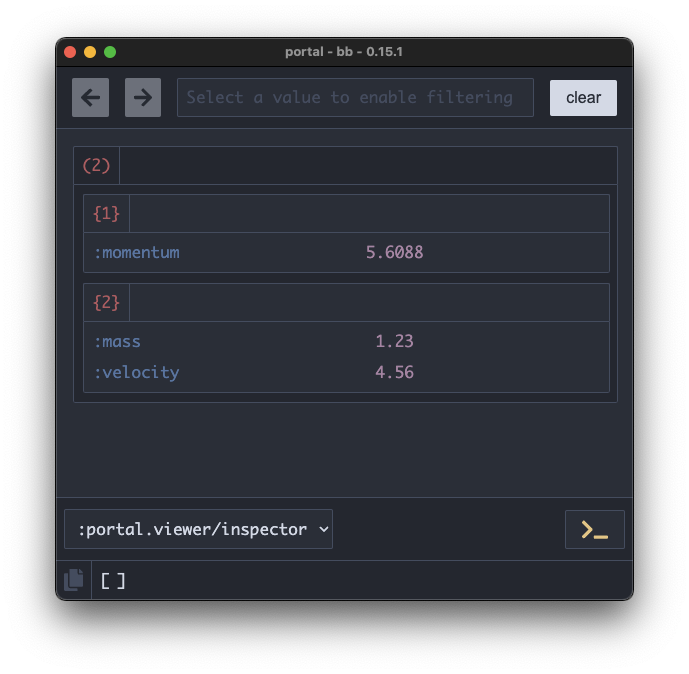
<p>After a couple of seconds, a portal window will appear with the request and response data. Huzzah!</p>

<p><img src="/assets/img/blog/portal_capture.png" alt="portal screenshot" /></p>

<p>Data in the portal window is listed in reverse chronological order. The newest data is at the top of the window. You will see the response data listed first followed by the request data. A second request will appear at the top and “push down” the data from the first request.</p>

<p>Portal’s value increases as the amount of data you need to navigate grows.</p>

<h2 id="viewing-additional-request-data">Viewing additional request data</h2>

<p>Sometimes we may want to see more information about the request, such as headers, cookies, or query parameters. By tweaking our middleware stack, we can send additional request information to portal. Replace the middleware configuration in <code class="language-plaintext highlighter-rouge">fnrun.yaml</code> with the following.</p>

<div class="language-yaml highlighter-rouge"><div class="highlight"><pre class="highlight"><code><span class="na">middleware</span><span class="pi">:</span>
  <span class="p">- </span><span class="na">fnrun.middleware/json</span><span class="pi">:</span>
      <span class="na">input</span><span class="pi">:</span> serialize
  <span class="p">- </span><span class="na">fnrun.middleware/tap</span><span class="pi">:</span> ./parse-and-tap
  <span class="p">- </span><span class="na">fnrun.middleware/json</span><span class="pi">:</span>
      <span class="na">input</span><span class="pi">:</span> deserialize
  <span class="p">- </span><span class="na">fnrun.middleware/key</span><span class="pi">:</span> body
  <span class="p">- </span><span class="na">fnrun.middleware/json</span><span class="pi">:</span>
      <span class="na">input</span><span class="pi">:</span> deserialize
      <span class="na">output</span><span class="pi">:</span> serialize
  <span class="p">- </span><span class="na">fnrun.middleware/jq</span><span class="pi">:</span>
      <span class="na">input</span><span class="pi">:</span> <span class="s">'[.mass, .velocity] | join(",")'</span>
      <span class="na">output</span><span class="pi">:</span> <span class="s">'{ "momentum": split(",") | .[2] | tonumber }'</span>
</code></pre></div></div>

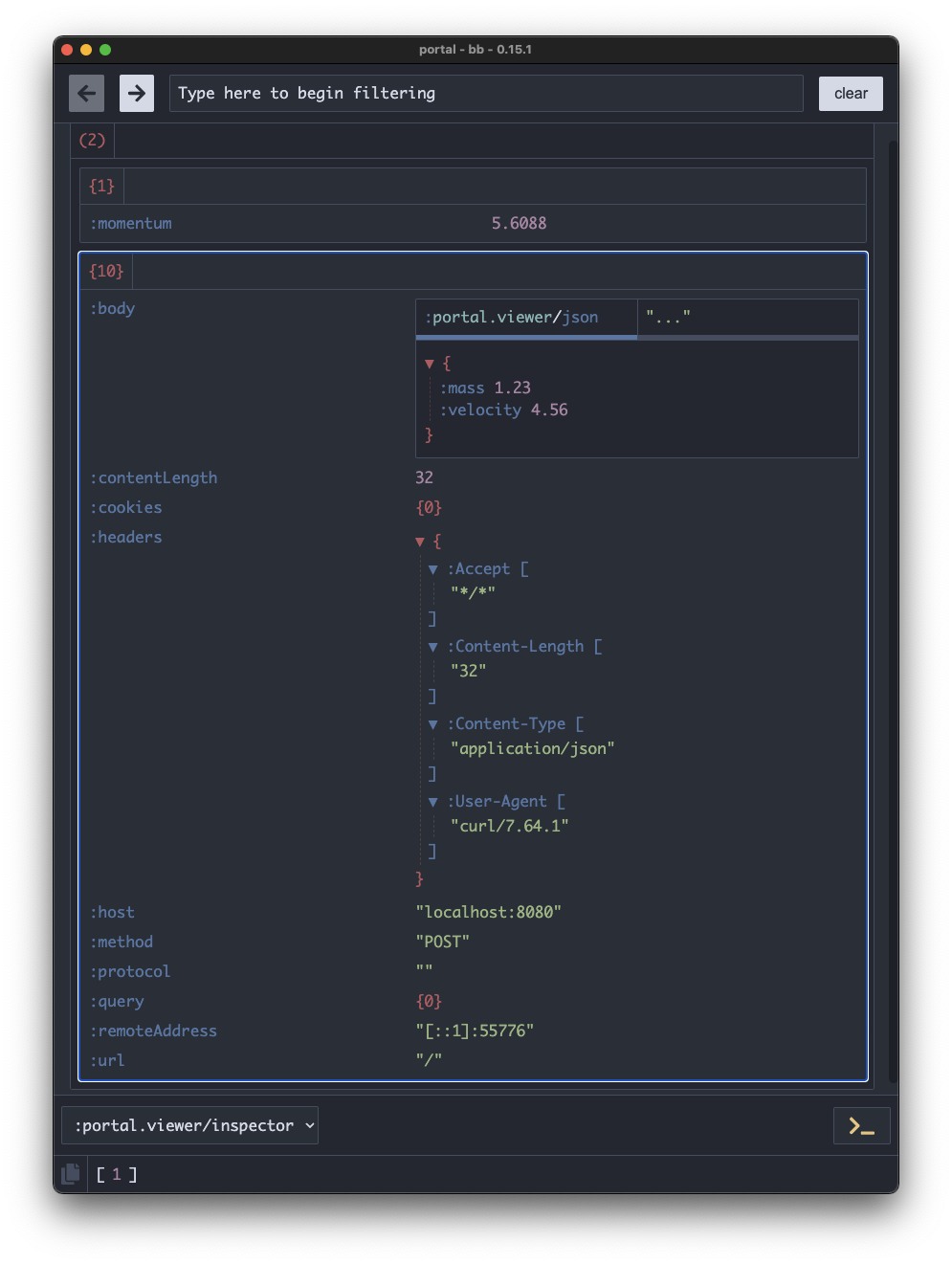
<p>If you restart the fnrunner application and execute the same curl command in the previous section, you will get much richer request information. Neat!</p>

<p><img src="/assets/img/blog/portal_captured_request.png" alt="portal screenshot with request data" /></p>

<p>Notice that the data in portal is asymmetric. We display a lot more information about the request than the response. This is due to where we are creating the HTTP response to return to the caller. The http source will create the HTTP response because we used the <code class="language-plaintext highlighter-rouge">treatOutputAsBody</code> setting. The tap middleware only sees data at a point in the middleware pipeline. We do not have access to the response data generated by the source itself.</p>

<p>An alternative approach is to build an output that conforms to the <a href="https://fnrun.dev/docs/sources/http/#outputs">http source spec</a> for creating HTTP responses. The tradeoff is that you start moving concerns of creating the HTTP response into the middleware pipeline or the business function.</p>

<h2 id="wrapping-up">Wrapping up</h2>

<p>This article showed you one way to visualize data flowing through your serverless functions using fnrun and portal. We hope you find it interesting and useful. Do you have other ideas of how to use these projects? We would love to hear from you! Please reach out to <a href="https://twitter.com/djblue_live">Chris</a> or <a href="https://twitter.com/tessellator">me</a> on Twitter or drop a note in <code class="language-plaintext highlighter-rouge">#portal</code> on the Clojurians Slack.</p>

]]></content>
    <author><name>Chad Taylor</name></author>
    <category term="serverless" />
    <category term="fnrun" />
    <summary type="html">Wouldn't it be cool to visually navigate the data flowing through your functions? This post demonstrates how to do so using fnrun and portal.</summary>
  </entry>
  <entry>
    <title type="html">Using Clojure in GitHub Actions without the setup-clojure Action</title>
    <link href="/blog/using-clojure-in-github-actions-without-the-setup-clojure-action" rel="alternate" type="text/html" title="Using Clojure in GitHub Actions without the setup-clojure Action" />
    <published>2021-07-08T00:00:00+00:00</published>
    <updated>2021-07-08T00:00:00+00:00</updated>
    <id>/blog/using-clojure-in-github-actions-without-the-setup-clojure-action</id>
    <content type="html" xml:base="/blog/using-clojure-in-github-actions-without-the-setup-clojure-action"><![CDATA[<p>GitHub Actions is a great CI tool, and there are many great actions developed by third parties. I use Clojure in many of my personal and professional projects, and I frequently use <a href="https://github.com/DeLaGuardo/setup-clojure">setup-clojure</a> in my workflows. However, some organizations have security rules configured that disallow actions that are not internal to the organization or verified on the GitHub Marketplace.</p>

<p>There are no verified Clojure setup actions at the time of writing, so you must take on the installation of Clojure yourself if you work in an organization with these security rules in place. Thankfully, it is a fairly straightforward process to install and cache the Clojure installation.</p>

<p>Following is a simple CI process that runs on pull requests. It caches a Clojure installation based on the version (defined as <code class="language-plaintext highlighter-rouge">CLOJURE_VERSION</code>) and will download and install Clojure only if necessary.</p>

<p>The cache action cannot create files and directories under <code class="language-plaintext highlighter-rouge">/usr/local/</code>, which is where Clojure is installed by default. The workflow will install Clojure in <code class="language-plaintext highlighter-rouge">$HOME/bin/clojure</code> which can be accessed by the cache action. The workflow will then make the action available on the path so that normal clojure commands may be used in subsequent steps.</p>

<div class="language-yaml highlighter-rouge"><div class="highlight"><pre class="highlight"><code><span class="na">name</span><span class="pi">:</span> CI
<span class="na">on</span><span class="pi">:</span>
  <span class="na">pull_request</span><span class="pi">:</span>

<span class="na">jobs</span><span class="pi">:</span>
  <span class="na">test</span><span class="pi">:</span>
    <span class="na">runs-on</span><span class="pi">:</span> ubuntu-latest
    <span class="na">env</span><span class="pi">:</span>
      <span class="na">CLOJURE_VERSION</span><span class="pi">:</span> 1.10.3.855

    <span class="na">steps</span><span class="pi">:</span>
      <span class="p">- </span><span class="na">name</span><span class="pi">:</span> Checkout
        <span class="na">uses</span><span class="pi">:</span> actions/checkout@v2

      <span class="p">- </span><span class="na">name</span><span class="pi">:</span> Set up Java
        <span class="na">uses</span><span class="pi">:</span> actions/setup-java@v2
        <span class="na">with</span><span class="pi">:</span>
          <span class="na">distribution</span><span class="pi">:</span> adopt
          <span class="na">java-version</span><span class="pi">:</span> <span class="mi">11</span>

      <span class="p">- </span><span class="na">name</span><span class="pi">:</span> Cache Clojure install
        <span class="na">id</span><span class="pi">:</span> cache-clojure
        <span class="na">uses</span><span class="pi">:</span> actions/cache@v2
        <span class="na">with</span><span class="pi">:</span>
          <span class="na">path</span><span class="pi">:</span> ~/bin/clojure
          <span class="na">key</span><span class="pi">:</span> ${{ env.CLOJURE_VERSION }}

      <span class="p">- </span><span class="na">name</span><span class="pi">:</span> Set up Clojure
        <span class="na">if</span><span class="pi">:</span> steps.cache-clojure.outputs.cache-hit != 'true'
        <span class="na">run</span><span class="pi">:</span> <span class="o">|</span>
          curl -O https://download.clojure.org/install/linux-install-${CLOJURE_VERSION}.sh
          chmod +x linux-install-${CLOJURE_VERSION}.sh
          sudo ./linux-install-${CLOJURE_VERSION}.sh --prefix ~/bin/clojure

      <span class="p">- </span><span class="na">name</span><span class="pi">:</span> Add Clojure to path
        <span class="na">run</span><span class="pi">:</span> echo "$HOME/bin/clojure/bin" &gt;&gt; $GITHUB_PATH

      <span class="p">- </span><span class="na">name</span><span class="pi">:</span> Cache maven artifacts
        <span class="na">id</span><span class="pi">:</span> cache-maven
        <span class="na">uses</span><span class="pi">:</span> actions/cache@v2
        <span class="na">with</span><span class="pi">:</span>
          <span class="na">path</span><span class="pi">:</span> ~/.m2
          <span class="na">key</span><span class="pi">:</span> ${{ runner.os }}-${{ hashFiles('deps.edn') }}

      <span class="p">- </span><span class="na">name</span><span class="pi">:</span> Download dependencies
        <span class="na">if</span><span class="pi">:</span> steps.cache-maven.outputs.cache-hit != 'true'
        <span class="na">run</span><span class="pi">:</span> clojure -A:test -Stree

      <span class="p">- </span><span class="na">name</span><span class="pi">:</span> Run tests
        <span class="na">run</span><span class="pi">:</span> ./scripts/kaocha

</code></pre></div></div>

]]></content>
    <author><name>Chad Taylor</name></author>
    <category term="clojure" />
    <category term="ci" />
    <summary type="html">I discovered how to use Clojure in GitHub Actions without the setup-clojure action.</summary>
  </entry>
  <entry>
    <title type="html">Reducing OpenFaaS Clojure Template Build Times</title>
    <link href="/blog/reducing-openfaas-clojure-template-build-times" rel="alternate" type="text/html" title="Reducing OpenFaaS Clojure Template Build Times" />
    <published>2019-02-08T00:00:00+00:00</published>
    <updated>2020-05-03T00:00:00+00:00</updated>
    <id>/blog/reducing-openfaas-clojure-template-build-times</id>
    <content type="html" xml:base="/blog/reducing-openfaas-clojure-template-build-times"><![CDATA[<div class="alert alert-warning" role="alert">
    <span class="icon"></span>
    <div class="content">
        <p>
            This article is now obsolete. The features described in this article were added to the OpenFaaS Clojure Template on May 2, 2021.
        </p>
    </div>
</div>

<p>One of my concerns about the <a href="https://github.com/tessellator/openfaas-clojure-template">OpenFaaS Clojure Template</a> has been that it takes a very long time to build and package a function. This is largely due to the fact that none of the Clojure project dependencies are cached between builds. The template downloads a fresh copy of each dependency for every build.</p>

<p>I created a Docker image called the OpenFaaS Clojure Builder (<a href="https://github.com/tessellator/openfaas-clojure-builder">GitHub</a>, <a href="https://hub.docker.com/r/tessellator/openfaas-clojure-builder">Docker Hub</a>) to address this concern. The image contains the Clojure CLI tools and a Maven cache preloaded with all of the dependencies required by the OpenFaaS Clojure Template as well as some popular libraries including compojure, clj-http, and cheshire. Since the image contains a preloaded Maven cache the template does not have to download those dependencies on every build, resulting in significantly reduced build times.</p>

<p>The OpenFaaS Clojure Builder is now the starting image for the OpenFaaS Clojure Template build step.</p>

<p>If you are already using the OpenFaaS Clojure template, you can update to the latest version with the following command:</p>

<div class="language-plaintext highlighter-rouge"><div class="highlight"><pre class="highlight"><code>faas template pull --overwrite https://github.com/tessellator/openfaas-clojure-template
</code></pre></div></div>

<p>If you have other common dependencies you would like to see added to the image please let me know, and PRs are welcome.</p>

]]></content>
    <author><name>Chad Taylor</name></author>
    <category term="clojure" />
    <category term="serverless" />
    <category term="openfaas" />
    <summary type="html">I found a way to reduce the time it takes to build and package a function using the OpenFaaS Clojure Template.</summary>
  </entry>
</feed>